Maintenance Schedule
| Task | Frequency |
|---|---|
|
PCB Filter Composite block filter
A 4-in-1 composite block that handles sediment, carbon, and pre-filtration in one cartridge. Rated for 12 months or about 950 gallons, whichever comes first.
|
Every 12 Months |
|
RO Membrane 600 GPD reverse osmosis membrane
The core filtration element. Rated for 24 months or about 1,900 gallons. Replace sooner if flow drops or the TDS OUT number on your faucet starts climbing.
|
Every 12–24 Months |
|
Watch the TDS reading on your faucet
Your faucet shows TDS IN (tap water) and TDS OUT (filtered). A steadily rising TDS OUT is the earliest warning that the membrane is wearing out — long before you'd taste it.
|
Ongoing |
On the 6-month vs. 12-month question: the factory manual rates the PCB filter at 12 months or 950 gallons. Our supplier suggests 6–8 months. Which one applies to you depends on how much water your household actually runs through it — a family of five hits 950 gallons a lot faster than a couple does. The ring light on the faucet is the real answer: when two segments are left, you're at roughly 4–15% of filter life (about 40–150 gallons), which is the moment to order a replacement.
Filters & Supplies
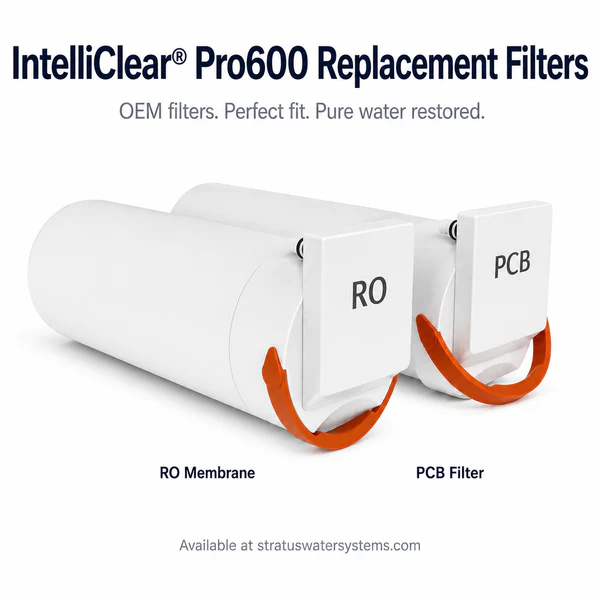
IntelliClear® Pro600 Replacement Filters
Genuine OEM filters for your Pro600. Available as the Filter + Membrane Combo (best value), PCB Filter only, or RO Membrane only. Only 2 parts ever need replacing.
Buy at Stratus Water
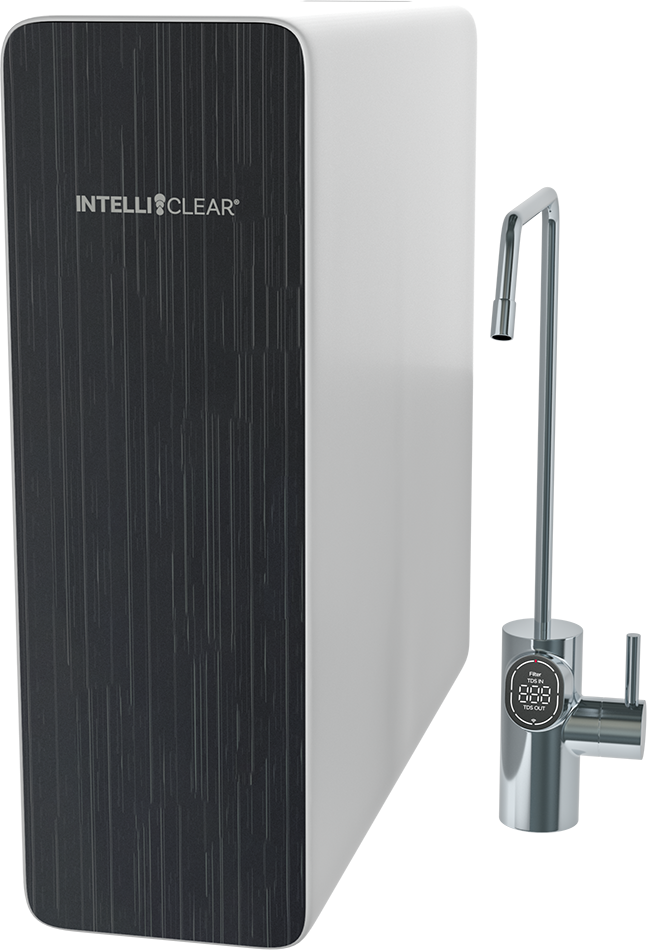
Make sure it says Pro600
The Pro600 and the RO600 are both 600 GPD IntelliClear units, but they take different cartridges. The Pro600 is the one with the digital faucet and two filters. If you're not certain which you have, send us a photo before you order.
Compare the three RO systems
How to Change a Filter
- Close the 3-way valve on your cold water supply line under the sink.
- Unplug the unit from the outlet.
- Open the drinking water faucet to release the pressure in the system.
- Take the cover off the main unit.
- Pull the handle lock down, then lift the handle.
- Hold the handle with one hand and pull the old filter out by its grip.
- Hold the handle and slide the new filter in.
- Push the filter handle down until it clicks into place.
- Close the faucet, reopen the 3-way valve, and plug the unit back in.
- Press power. All the indicators flash for about 5 seconds with 5 beeps, then the unit auto-cleans for 25 seconds. Don't use the faucet during that time.
- Once startup finishes, press and hold Reset for 3 seconds until you hear a beep. To reset one specific filter instead, tap Reset until that filter's indicator blinks, then hold for 3 seconds until it stays lit.
- Run the faucet for at least 20 minutes before drinking the water. This is not optional on a fresh cartridge.
Don't reset the filter light early. The counter is what protects you from drinking through a spent cartridge, so only reset it after the filter is physically swapped.
Error Codes on the Faucet
|
E6 Timeout protection
The system ran continuously for more than 40 minutes and shut itself off to protect the pump. Hold the power button for 3 seconds to turn it off, then hold it 3 seconds again to turn it back on. It will auto-flush for 25 seconds — slow flow during that flush is normal.
|
|
E9 Faucet not communicating
The faucet isn't receiving data from the unit. Check that the faucet's power cord is plugged in, and look it over for damage. If the cord is damaged, call us — don't try to splice it.
|
|
EA TDS display fault
The TDS reading isn't working right. Unplug the unit, wait a moment, and plug it back in. If the code comes back, give us a call.
|
|
Screen shows "Filter" and the ring light is off
Not a fault. That's the filter reminder telling you a cartridge has reached the end of its rated life. Order a replacement.
|
Normal Behavior & Common Questions
|
The unit hums and vibrates when making water
Normal. The Pro600 has an internal pressure pump. It also means the system won't make water during a power outage, so if you know a storm is coming, fill a pitcher in advance.
|
|
The display went dark
Standby mode. The screen sleeps after a minute of no use, and the unit itself goes to standby after 3 hours idle. It wakes up as soon as you use the faucet.
|
|
Water flow has slowed down
Check that the 3-way valve is fully open first. If it is, the filter is blocked or spent — replace it.
|
|
Water tastes different
If it sat unused for a few days, run the faucet for 5 minutes. If the taste is still off, the filter is at the end of its life.
|
|
No water from the faucet at all
Usually an air bubble after a filter change or a water shut-off. Close the 3-way valve, unplug the unit, run your regular kitchen faucet to confirm you have water, then reopen the valve and plug it back in. If there's still nothing, the leak detector may have tripped — call us.
|
|
Water leaking from the unit
Close the 3-way valve, unplug it, and call us right away. Don't keep running it.
|
Specifications
| Model | INTELLICLEAR-Pro600 |
| Production rate | 600 GPD (gallons per day) |
| Replaceable filters | PCB composite filter and RO membrane |
| PCB filter life | 12 months / 950 gallons |
| RO membrane life | 24 months / 1,900 gallons |
| Dimensions (H × W × D) | 18.1" × 5.2" × 16.5" |
| Weight (net) | 20.5 lbs |
| Power | 100–240V AC, 50/60 Hz, 4A, 80W |
| Inlet water pressure | 14–100 psi |
| Inlet water temperature | 40–100°F |
| Max inlet TDS | 750 ppm |
| Max inlet turbidity | 1 NTU |
| Water source | Municipal tap water only — not for well water |
| Warranty | 1-year limited |
| Manufacturer support | 1-877-781-8777 |
System Manual
IntelliClear® Pro600 — 600 GPD Tankless RO with Digital Smart Faucet
Need a Hand?
Our team is available for service calls, tune-ups, and repairs throughout the Houston area.