Maintenance Schedule
| Task | Frequency |
|---|---|
|
PAC Sediment & carbon pre-filter
The first stage, in the left bay. Catches sediment and strips out the chlorine and chloramine in Houston water that would otherwise chew up the membrane. Watch the PAC indicator light.
|
Every 6–12 Months |
|
RO 600 GPD reverse osmosis membrane
The core filtration element, and the one that lasts longest. Replace when flow drops noticeably or your water starts tasting different. Watch the RO indicator light.
|
Every 12–18 Months |
|
C2 Post-carbon polishing filter
In the right bay. This one runs after the membrane, not before it — it's the final polish that takes any leftover taste and odor out on the way to your faucet. Watch the C indicator light.
|
Every 6–12 Months |
|
Press the Flush button after any filter change
Clears carbon dust and preservative out of the new cartridge. Takes about a minute and makes the first glass taste right.
|
Every Change |
On the 6-month vs. 12-month question: the cartridge labels themselves say "replace every 6–12 months or 1,500 gallons," which is a range rather than a date because it depends on how much water your household actually runs. A family of five reaches 1,500 gallons far sooner than a couple does. Go by the indicator lights and by taste, and don't stretch any cartridge past 12 months regardless of usage.
Filters & Supplies
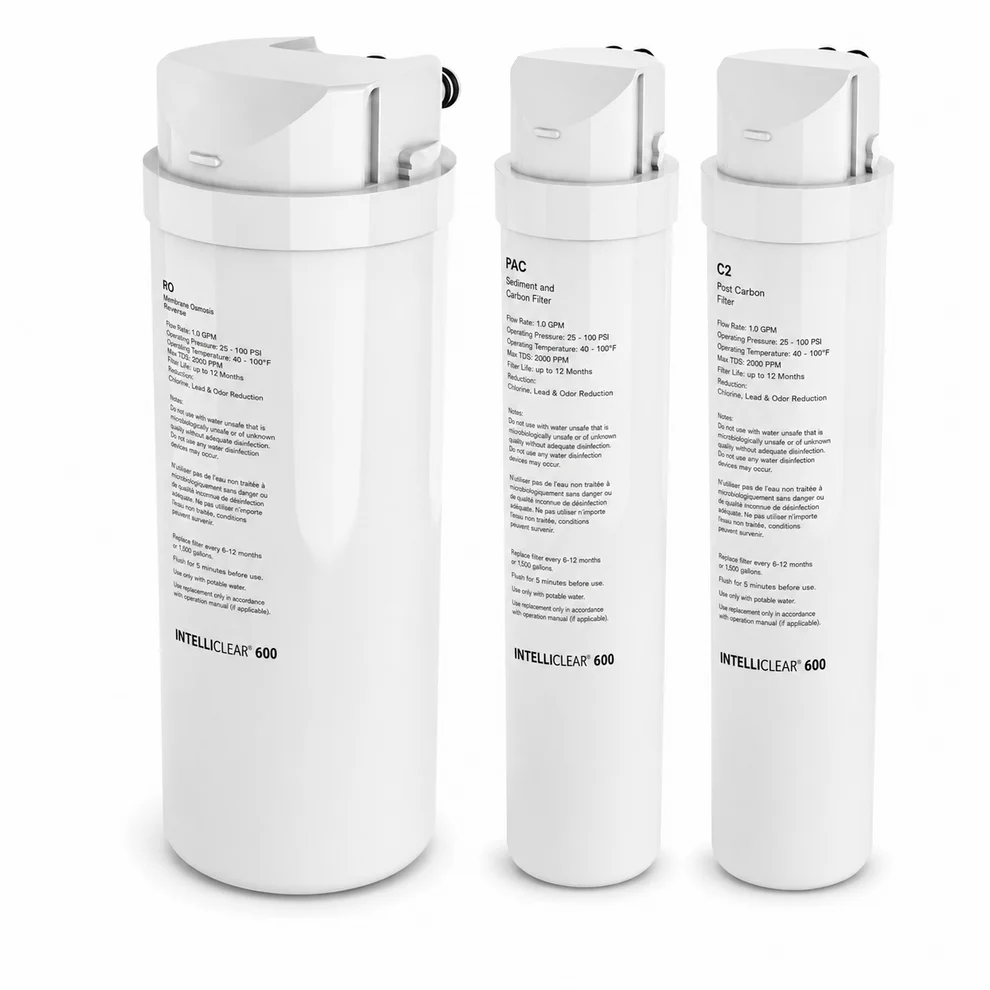
IntelliClear® RO600 Replacement Filters
Genuine OEM cartridges for your RO600. Order the Dual Filter Pack for a routine PAC + C2 change, the 600 GPD RO Membrane on its own, or the Filter + Membrane Combo when everything is due at once. An optional alkaline remineralization filter is available on the same page.
Your cartridges will be labeled RO, PAC, and C2 — that's how you confirm you received the right set. All three are rated 1.0 GPM at 25–100 PSI, 40–100°F, and up to 2,000 PPM inlet TDS.
Buy at Stratus Water
Order the RO600 set, not the Pro600 set. Both are 600 GPD IntelliClear units, but they take different cartridges. If you land on a Pro600 page by mistake, back out — or send us a photo and we'll confirm the right one before you pay for it.
How to Change a Filter
- Close the 3-way valve on your cold water supply line under the sink.
- Open the drinking water faucet to release the pressure in the system.
- Unplug the unit from the outlet.
- Take the cover off the main unit (it comes off the front or the back).
- Lift the locking handle up and pull the old filter straight out.
- Insert the new filter, seating the bottom into the base of the unit. PAC goes in the left bay, C2 goes in the right bay — these two are not interchangeable, and swapping them means unfiltered chlorine hits your membrane.
- Line the filter nozzles up with the ports, then pull the locking handle back down.
- Put the cover back on, plug the unit in, and let it finish starting up.
- Press and hold Reset for 3 seconds. To reset one specific filter instead, tap Reset until that filter's light blinks, then hold it for 3 seconds until the light stays on.
- Press Flush to flush the new cartridge.
- Run the faucet for at least 20 minutes before drinking the water. This is not optional on a fresh cartridge.
Common Questions
|
Water flow has slowed down
First check that the 3-way valve is all the way open. If it is, a filter is blocked or at the end of its life — replace it.
|
|
Water tastes or smells different
If you haven't used it in a few days, run the faucet for 5 minutes and try again. If the taste stays off, the filter is done.
|
|
No water at all from the RO faucet
Usually an air bubble in the lines after a filter change or a water shut-off. Close the 3-way valve, unplug the unit, run your regular kitchen faucet to confirm you have water, then reopen the valve and plug the unit back in. If there's still nothing, call us — the leak detector may have tripped.
|
|
Humming or vibrating while it makes water
Normal. The RO600 has an internal pump, and you'll hear it working. It also means the system won't produce water during a power outage.
|
|
Water leaking from the unit
Close the 3-way valve, unplug it, and call us right away. Don't keep running it.
|
Specifications
| Model | IntelliClear® RO600 |
| Production rate | 600 GPD (gallons per day) |
| Replaceable filters | PAC sediment/carbon pre-filter, RO membrane, C2 post-carbon |
| Dimensions (H × W × D) | 14.3" × 6.5" × 13.2" |
| Weight (net) | 16.5 lbs |
| Power | 100–125V AC, 50/60 Hz, 75W |
| Water source | Municipal tap water only — not for well water |
| Max inlet turbidity | 1 NTU |
| Max inlet iron | 0.05 ppm |
| Manufacturer support | 1-877-781-8777 |
System Manual
IntelliClear® RO600 — 600 GPD Tankless RO
Need a Hand?
Our team is available for service calls, tune-ups, and repairs throughout the Houston area.